
Connect to AWS EC2 Without Opening SSH Port 22
An EC2 instance does not need to expose SSH to the internet just because administrators need to access it.
AWS Systems Manager Session Manager provides a different approach: keep the EC2 instance in a private subnet, remove inbound SSH access, and manage the instance through an identity-controlled (/IAM user) SSM session.
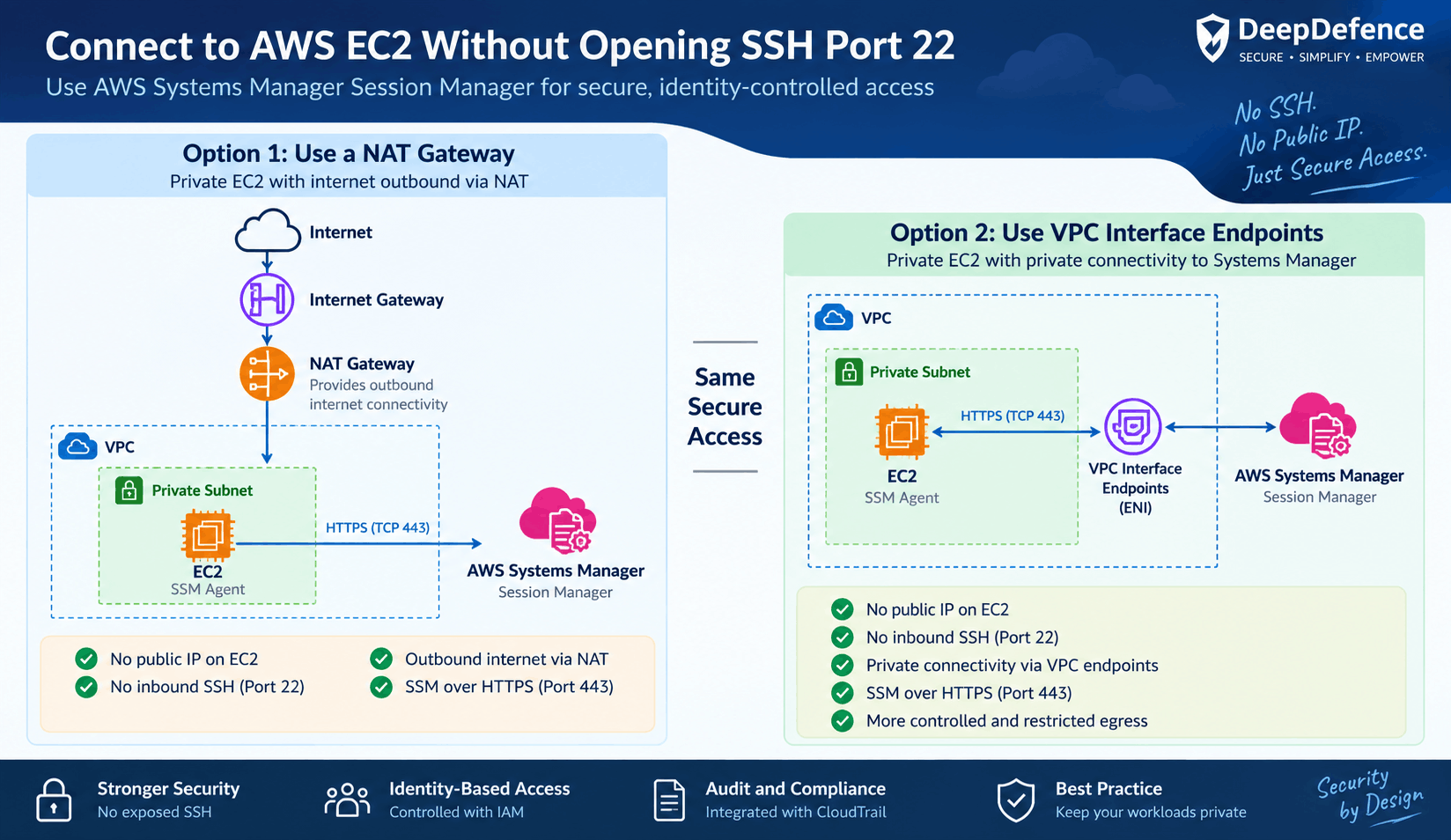
This article walks through the architecture and shows two ways to provide the EC2 instance with connectivity to AWS Systems Manager: NAT Gateway and VPC Interface Endpoints.
Why Avoid Exposing SSH?
A common EC2 architecture places an instance in a public subnet and allows inbound TCP port 22:
SSH itself is not inherently insecure. With appropriate network restrictions and hardening, SSH can be operated securely. However, managing private keys is the problem.
For example, if an employee leaves an organization, an SSH private key that was previously issued to that employee may still be usable unless the corresponding public key is removed from the affected systems.
Systems Manager provides an alternative where access can be controlled through AWS IAM, rather than relying solely on long-lived SSH keys.
The Alternative: Private EC2 + Systems Manager
With AWS Systems Manager Session Manager, the EC2 instance can remain completely private.
                 AWS VPC
  +---------------------------------------------+
  |                                             |
  |   Private Subnet                            |
  |                                             |
  |      +------------------+                   |
  |      |      EC2         |                   |
  |      |                  |                   |
  |      |   SSM Agent      |                   |
  |      +------------------+                   |
  |                                             |
  +---------------------------------------------+
                    |
                    HTTPS / TCP 443


              AWS Systems Manager
The important difference is that the SSM Agent on the EC2 instance establishes the communication channel to Systems Manager. Systems Manager does not need to initiate a new inbound TCP connection to the EC2 instance.
Therefore, the EC2 Security Group does not need an inbound SSH rule.
In fact, for SSM access, the EC2 instance can have:
- No public IP address
- No inbound TCP port 22
- No inbound TCP port 443
- Outbound HTTPS connectivity to Systems Manager
How Does the SSM Communication Work?
The direction of the underlying network connection is important.
Once the communication channel is established, an administrator can request a Session Manager session from the AWS Console or CLI.
This is why an inbound management port does not need to be exposed on the EC2 instance.
What Does the EC2 Instance Need?
For an Amazon Linux EC2 instance, the AWS-provided Amazon Linux AMIs generally include the SSM Agent.
The instance also needs an IAM instance profile that permits Systems Manager functionality. A commonly used AWS-managed policy is:
AmazonSSMManagedInstanceCoreThe third requirement is network connectivity from the EC2 instance to the Systems Manager service.
There are two common ways to provide this connectivity:
- NAT Gateway
- VPC Interface Endpoints
Option 1: Use a NAT Gateway
A straightforward architecture is to place the EC2 instance in a private subnet and route its outbound traffic through a NAT Gateway.
The EC2 instance does not need a public IP. The NAT Gateway provides outbound internet connectivity on behalf of the private instance.
If the EC2 Security Group has a default outbound rule such as All traffic → 0.0.0.0/0, TCP 443 is already permitted. Alternatively, outbound HTTPS can be explicitly allowed.
The important point is that no inbound TCP 22 rule is required on the EC2 instance.
Option 2: Use VPC Interface Endpoints
A more tightly controlled architecture is to use VPC Interface Endpoints for Systems Manager.
An interface endpoint creates an Elastic Network Interface (ENI) with a private IP address inside your VPC. The EC2 instance can communicate with the AWS service through this private endpoint.
                    AWS

              Systems Manager

             VPC Interface
                Endpoint
                  (ENI)

                 TCP 443

                    EC2

               Private Subnet
The traffic does not need to travel through an Internet Gateway or NAT Gateway to reach Systems Manager.
This allows an organization to build a private EC2 environment where connectivity to AWS services is explicitly controlled.
Which Interface Endpoints Are Required?
For a current Systems Manager setup, the important interface endpoints are typically:
com.amazonaws.<region>.ssm
com.amazonaws.<region>.ssmmessages
For example, in the Mumbai region:
com.amazonaws.ap-south-1.ssm
com.amazonaws.ap-south-1.ssmmessages
The exact endpoint requirements can depend on the AWS Region and Systems Manager Agent version, so AWS documentation should be checked when implementing this in a specific environment.
How Security Groups Work with the Interface Endpoint
This is an area that is easy to misunderstand.
Suppose the EC2 instance has Security Group EC2-SG and the interface endpoint has Security Group SSM-ENDPOINT-SG.
The EC2 initiates the HTTPS connection:
Therefore, the endpoint Security Group needs an inbound HTTPS rule such as:
Inbound:
TCP 443
Source: EC2-SG
The EC2 Security Group needs outbound HTTPS access to the endpoint. It does not need an inbound HTTPS rule for SSM.
If the EC2 Security Group already has the default outbound All traffic → 0.0.0.0/0 rule, a separate outbound 443 rule is not necessary. In a hardened environment, that broad rule can instead be replaced with a more restrictive rule allowing TCP 443 to the appropriate endpoint Security Group.
Recommended Security Group Model
For a tightly controlled environment, the Security Groups can be structured as follows.
EC2 Security Group
Inbound:
    No TCP 22 required for SSM
    No TCP 443 required for SSM

Outbound:
    TCP 443 → SSM Endpoint Security Group
SSM Endpoint Security Group
Inbound:
    TCP 443 ← EC2 Security Group
Notice that there is no 0.0.0.0/0 inbound rule on the EC2 instance for SSM.
Why We Prefer VPC Endpoints for Highly Sensitive Workloads
NAT Gateway is perfectly valid and often the simplest solution. However, for highly sensitive workloads, VPC Interface Endpoints provide an additional architectural advantage.
The EC2 instance does not need general internet egress simply to communicate with Systems Manager.
This makes it possible to apply a more restrictive egress model: allow the workload to communicate with the AWS services it actually needs rather than providing broad internet access.
Connect to the EC2 Using Session Manager
Once the EC2 instance is registered with Systems Manager and shows as available, an administrator can use:
The administrator gets a shell on the instance without requiring an inbound SSH connection.
This is the preferred approach when the goal is simply administrative shell access.
What About Developers Who Still Need SSH?
There may be situations where developers or administrators specifically need their existing SSH-based tools(e.g. putty) or workflows.
AWS Systems Manager can also be used to create a port-forwarding session to the EC2 instance.
In this model, SSH is still used for authentication on the Linux instance, but port 22 is not exposed to the internet.
For example, an administrator can establish an SSM port-forwarding session to local port 2222 and then use:
ssh -i mykey.pem -p 2222 ec2-user@localhostThe SSH connection is effectively carried through the SSM channel.
However, if SSH itself is not required, Session Manager is preferable because it removes the need for SSH keys altogether.
The Bigger Security Benefit: Identity-Based Access
One of the strongest advantages of Session Manager is that administrative access can be tied to AWS IAM identities and permissions.
With traditional SSH, access is often based on possession of a private key:
With Session Manager, access can instead be controlled through AWS identity and authorization:
This makes employee access easier to manage centrally and can provide stronger auditing and access-control capabilities when appropriately configured.
Important: Private Does Not Automatically Mean Secure
Moving an EC2 instance to a private subnet and removing port 22 is a significant improvement in network exposure, but it is not a complete security strategy.
A production implementation should also consider:
- Least-privilege IAM policies
- Session Manager access controls
- CloudTrail auditing
- Session logging where appropriate
- Operating system patching
- EC2 hardening
- Network segmentation
- Controlled outbound access
- Monitoring and alerting
The objective is not simply to hide the EC2 instance. The objective is to control who can access it, how they access it, and what they can do once they are connected.
Recommended Architecture
For a highly sensitive production workload, a strong baseline architecture looks like this:
                         AWS
                          |
                  Systems Manager
                          |
                   VPC Interface
                      Endpoints
                          |
                    HTTPS / 443
                          |
        +-----------------+----------------+
        |          Private Subnet          |
        |                                  |
        |             EC2                  |
        |                                  |
        |          SSM Agent               |
        |                                  |
        |       No Public IP               |
        |       No inbound SSH             |
        |                                  |
        +----------------------------------+
If the environment requires general outbound internet connectivity for other purposes, a NAT Gateway can be used instead or alongside the interface endpoints.
Conclusion
An EC2 instance does not need to expose SSH to the internet simply because administrators need shell access.
AWS Systems Manager Session Manager allows the instance to remain private, while administrative access is controlled through AWS identity and authorization.
For SSM connectivity, a private EC2 instance can use a NAT Gateway or VPC Interface Endpoints. NAT is straightforward and provides general outbound connectivity. Interface Endpoints provide a more private and tightly controlled path to AWS services and can eliminate the need for a NAT Gateway when SSM is the required connectivity.
The core security principle is simple:
Don't expose SSH just because you need administrative access to an EC2 instance.
Keep the workload private. Control access through identity. And make the management path as small as possible.