
Introduction
Generative AI applications are becoming increasingly easy to build with Amazon Bedrock. Applications can invoke capable foundation models without having to operate the underlying infrastructure.
But there is a less obvious operational risk: AI consumption can become an unpredictable cloud-cost driver.
A runaway agent, unexpectedly high traffic, excessive token consumption, or repeated model invocations can increase AWS expenditure rapidly.
The traditional response is usually to alert someone when spending crosses a threshold and let an engineer investigate.
That works for many workloads—but AI applications introduce a different question:
What if we could progressively reduce AI capability as financial risk increases?
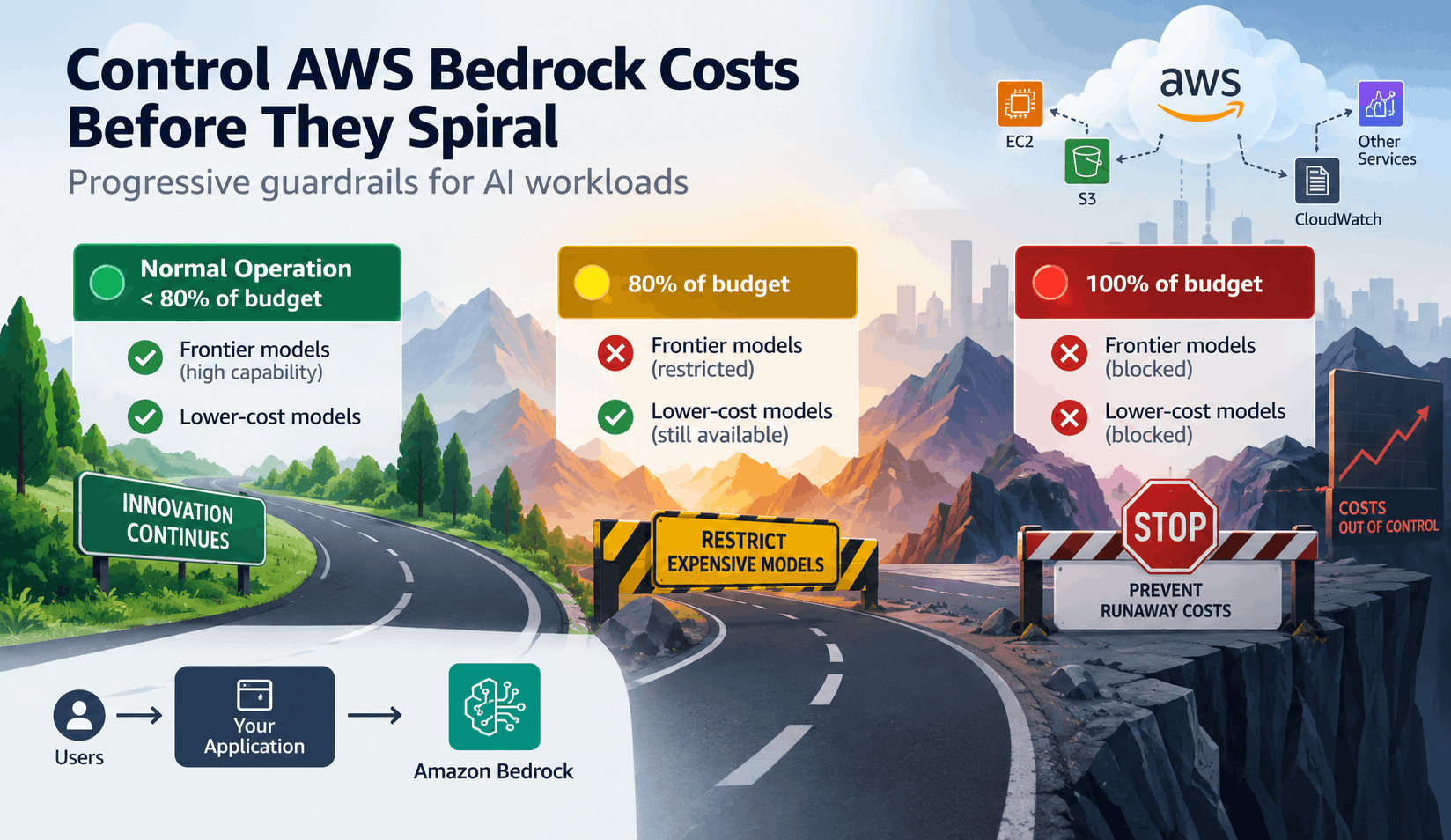
Instead of immediately shutting down the entire application, expensive models could be restricted first, allowing the application to continue operating with lower-cost models.
The Problem: AWS Budgets Don't Understand AI Workloads
AWS Budgets provides a useful mechanism for defining financial thresholds. However, the budget itself is generally concerned with AWS spending—not with the business importance of individual AI requests.
Consider an AWS environment with a monthly budget of $1,000.
| AWS Service | Monthly Spend | % of Total |
|---|---|---|
| Amazon Bedrock | $600 | 60% |
| EC2 | $200 | 20% |
| S3 | $75 | 7.5% |
| CloudWatch | $50 | 5% |
| Other AWS Services | $75 | 7.5% |
| Total | $1,000 | 100% |
Bedrock represents the largest individual cost component. However, the overall AWS budget is still useful because it provides a single financial signal for the environment.
The challenge is therefore not necessarily to create a Bedrock-only budget. The more interesting question is:
Can an AWS-wide financial trigger selectively control Bedrock?
Current Solutions
AWS Budgets
Provides budget thresholds and notifications when actual or forecasted expenditure crosses defined limits.
Cost Anomaly Detection
Helps identify unusual spending patterns that may indicate unexpected consumption.
IAM
Provides fine-grained authorization controls that can restrict access to specific Bedrock resources.
AWS Budget Actions
Can automatically apply IAM policies, SCPs, or other actions when a budget threshold is reached.
Why Current Provisions Are Not Sufficient
Alerts Don't Stop Consumption
A notification tells an engineer that spending has increased. It does not prevent additional consumption while the problem is being investigated.
A Complete Shutdown Is Too Aggressive
Completely disabling Bedrock may stop the cost increase, but it can also unnecessarily interrupt the application's core functionality.
A Central Cost-Control Service Adds Complexity
Introducing a synchronous service into every AI request path creates another component that must scale, remain available, and avoid becoming a single point of failure.
AWS Budgets Is Not a Real-Time Circuit Breaker
AWS billing and budget evaluation involve processing delays. Therefore, a budget threshold should not be treated as an exact real-time dollar limit.
Proposed Solution: Progressive Bedrock Cost Control
The key idea is simple:
Use the AWS-wide budget as the trigger, but target Bedrock as the remediation.
The budget scope and remediation scope do not have to be the same.
Instead of treating AI access as an all-or-nothing capability, divide model access into two practical classes:
Frontier / Expensive Models
Highest-capability models with comparatively higher inference costs.
Lower-cost Models
Lower-cost models that can continue supporting less demanding workloads.
Progressive Cost-Control Flow
As the overall AWS budget approaches its limit, sacrifice model sophistication before sacrificing application availability.
Implementation Walkthrough
1 Create an AWS-wide Budget
Create a monthly AWS budget—for example, $1,000.
The budget covers the AWS account rather than only Bedrock. This provides a broader financial signal for the environment.
2 Define the Two Intervention Thresholds
| Threshold | Action |
|---|---|
| 80% | Restrict frontier / expensive Bedrock models. Continue allowing lower-cost models. |
| 100% | Deny Bedrock inference entirely. |
Earlier thresholds such as 50% or 75% can still be used for notifications, but they are not part of the enforcement mechanism.
3 Identify the Bedrock Permissions
Bedrock inference is controlled through IAM authorization. The policy should specifically address the model resources that need to be restricted.
For model invocation, the relevant permissions include:
bedrock:InvokeModelbedrock:InvokeModelWithResponseStream
4 Create a Deny Policy for Frontier Models
Create an IAM policy that explicitly denies invocation of the selected frontier model resources.
{
  "Version": "2012-10-17",
  "Statement": [
    {
      "Effect": "Deny",
      "Action": [
        "bedrock:InvokeModel",
        "bedrock:InvokeModelWithResponseStream"
      ],
      "Resource": [
        "arn:aws:bedrock:us-east-1::foundation-model/<frontier-model-1>",
        "arn:aws:bedrock:us-east-1::foundation-model/<frontier-model-2>"
      ]
    }
  ]
}
The exact resource scope depends on the Bedrock model or inference profile being used. Test the policy against the actual invocation path before deploying it.
5 Attach the Frontier Denial to the 80% Budget Action
Configure an AWS Budget Action to apply the IAM policy when the AWS-wide budget reaches 80%.
Lower-cost models remain accessible, allowing the application to continue operating.
6 Configure the 100% Bedrock Shutdown
A second Budget Action can apply a broader denial policy when the AWS-wide budget reaches 100%.
This policy should deny the Bedrock inference permissions required by the application's invocation paths.
7 Implement Application-Level Fallback
The AWS Budget Action does not automatically rewrite a request for an expensive model into a request for a cheaper model.
The application should therefore recognize authorization/access-denied error and gracefully fall back to a lower-cost model.
8 Test the Failure Paths
Test the application at each enforcement stage:
- Normal operation with frontier models available.
- 80% threshold reached and frontier model access denied.
- Application successfully falling back to a lower-cost model.
- 100% threshold reached and Bedrock inference denied.
- Application handling the final failure gracefully.
Architecture
Notice that there is no synchronous cost-control service sitting between the application and Bedrock.
Application Data Path
Financial Control Path
The Bigger Principle
The interesting architectural principle is that the scope of the financial signal does not have to match the scope of the remediation.
| Component | Scope |
|---|---|
| Budget Scope | Entire AWS account |
| Trigger | Overall AWS spending |
| Remediation | Bedrock model access |
| First Intervention | Restrict frontier models at 80% |
| Final Intervention | Stop Bedrock inference at 100% |
| Objective | Reduce AI cost exposure while preserving application availability for as long as possible. |
This Is Not a Complete Cost-Control Strategy
The proposed mechanism should be considered one layer of a broader defense-in-depth strategy.
Limit request volume before consumption becomes excessive.
Prevent unauthorized users or applications from invoking AI.
Prevent unexpectedly large model consumption.
Prevent autonomous agents from creating excessive model invocation loops.
Detect unusual consumption patterns early.
Add additional infrastructure-level guardrails.
Conclusion
AI applications introduce a new dimension to cloud cost management. The ability to invoke increasingly capable models is powerful—but that capability also needs operational guardrails.
An alert followed by manual intervention may be too slow. Completely shutting down the AI workload may be unnecessarily disruptive.
A more resilient approach is to progressively reduce capability:
"Don't treat AI capability as an unlimited resource. Treat model access as a controllable resource that can be progressively restricted as financial risk increases."
Building AI Systems Securely?
DeepDefence helps organizations assess and secure AI systems, cloud environments, and applications.
Talk to DeepDefence